Trades Inserter
The Trades Inserter worker inserts trades from a datastore into their target portfolios. Use Target Portfolio mode to route all trades into a single portfolio, or Set By Portfolio UID mode to let each trade's Portfolio UID field determine its destination.
Parameters
Input
| Field | Description |
|---|---|
| Insertion Mode | How target portfolios are resolved. Accepts Fixed Select. Options: Target Portfolio, Set By Portfolio UID |
| Portfolio | Target portfolio for all trades. Only required in Target Portfolio mode. Accepts Fixed Portfolio, Get Latest, or Upstream Data |
| Incoming Trades | Trade data to insert, usually from a Trades Storage worker. Accepts Upstream Data, Fixed Datastore, or Get Latest |
| Notify Real-Time P&L Widget | Whether the inserted trades update an existing Real-Time P&L widget. Accepts Boolean |
| Generate Trades Provision | Whether to generate a provision for the inserted trades. Accepts Boolean |
Output
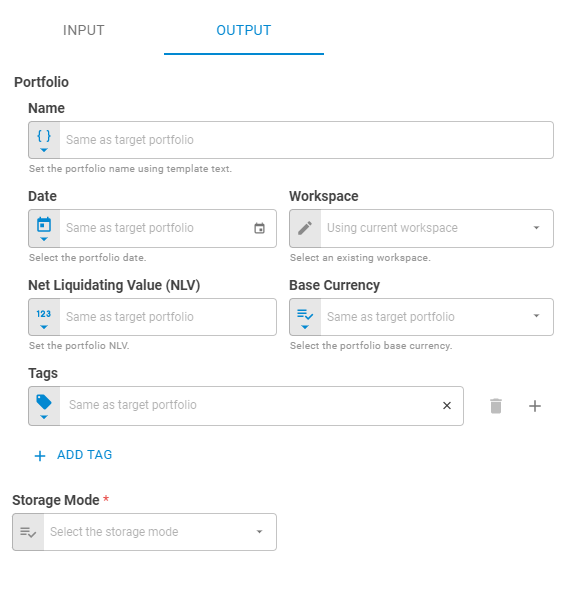
The Output fields apply only when Insertion Mode is set to Target Portfolio.
| Field | Description |
|---|---|
| Name | Portfolio name. Accepts Template Text or Upstream Data |
| Workspace | Workspace where the portfolio will be saved. Accepts Fixed Workspace |
| Date | Portfolio date. Accepts Fixed Date or Upstream Data |
| Net Liquidating Value (NLV) | Portfolio NLV. Accepts Fixed Number or Upstream Data |
| Base Currency | Portfolio base currency. Accepts Fixed Select or Upstream Data |
| Tags | Portfolio tags. Accepts Fixed Tags or Upstream Data |
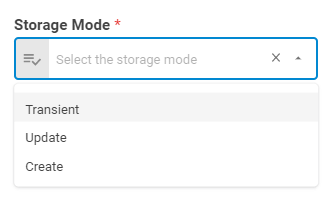
| Storage Mode | How the result is persisted. Options: Transient, Update, Create (Target Portfolio mode only) |

Result
The result varies by Insertion Mode.
When Insertion Mode is Target Portfolio:
- Portfolio (portfolio)
- ID (string)
- Name (string)
- Date (date)
- Tags (list)
- Base Currency (number)
- NLV (number)
- Securities (list)
When Insertion Mode is Set By Portfolio UID:
- List (list of portfolios)
- Portfolio (portfolio)
- ID (string)
- Name (string)
- Date (date)
- Tags (list)
- Base Currency (number)
- NLV (number)
- Securities (list)