Expression Solver
The Expression Solver worker evaluates mathematical expressions against values supplied by upstream workers and returns the result to the workflow.
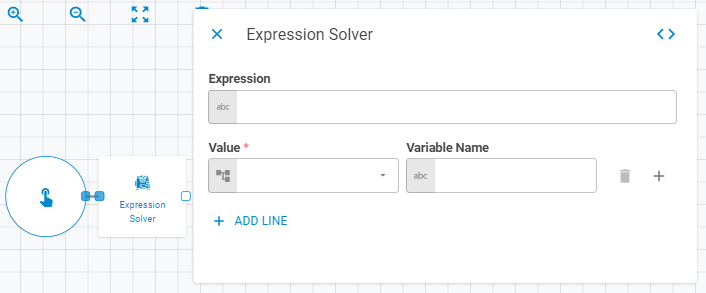
Parameters
| Field | Description |
|---|---|
| Operation | The operation to perform. Accepts Fixed Select. Default is Solve |
| Expression | The mathematical expression to evaluate (e.g. sum(x) * 2). Accepts a fixed expression string. Multiple expressions can be added via Add Expression |
| Output Label | Label for the result of this expression. Accepts a fixed string |
| Output Type | Data type of the result. Accepts Fixed Select |
| Output List Item Type | Item type when the result is a list. Accepts Fixed Select |
| Variables | Named variables referenced in the expression. Each variable has a Name (fixed string) and a Value (Upstream Data). Multiple variables can be added via Add Variable |
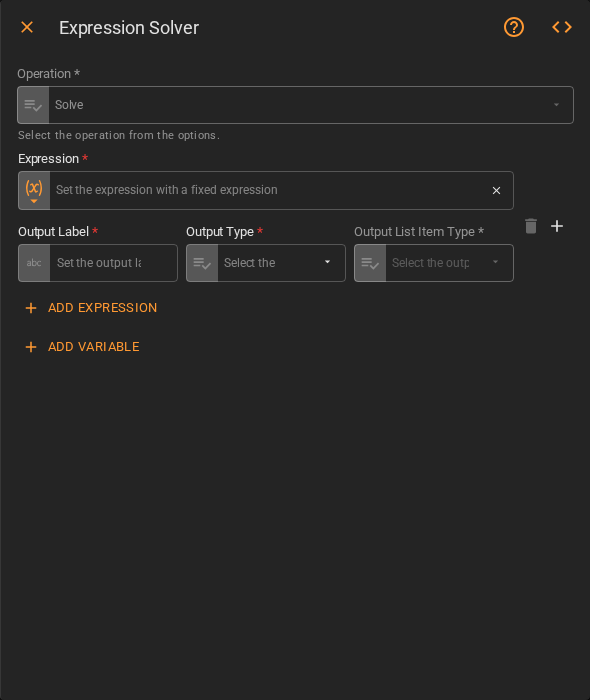
Available built-in functions:
| Function | Description |
|---|---|
log(x) |
Natural logarithm of x, element-wise |
exp(x) |
Exponential of all elements in a list |
sum(x) |
Sum of all elements in a list |
All standard arithmetic operators (+, -, *, /) are also supported.
Result
Once the worker finishes successfully, it returns the evaluated result(s) to the workflow. You can check the Output Types article to learn more about result object types.
- Result (number or list)