File Generator
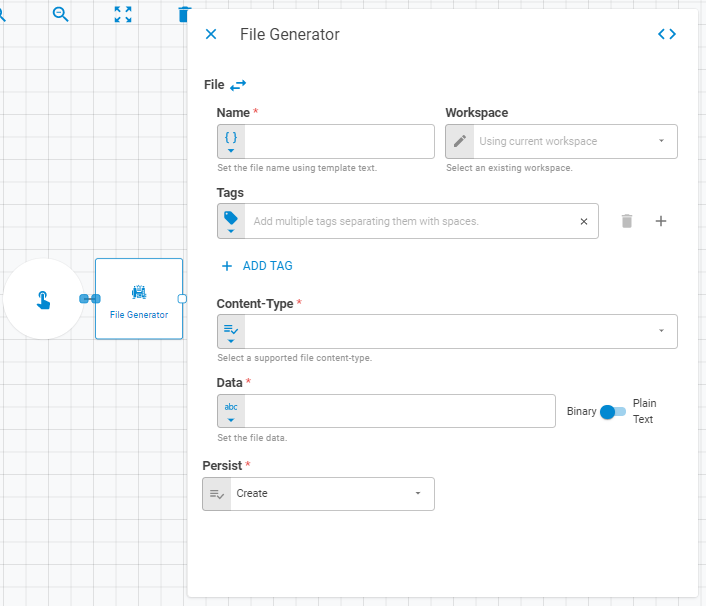
The File Generator worker creates a file from user-supplied parameters and either saves it to the Everysk platform or passes it downstream to other workers in the workflow.

Parameters
| Field | Description |
|---|---|
| Name | Name of the file. Accepts Template Text or Upstream Data |
| Workspace | Workspace where the file will be saved. Accepts Fixed Workspace. Defaults to the current workspace |
| Date | Date of the file. Accepts Fixed Date or Upstream Data. Defaults to today |
| Link UID | Link UID of the file. Accepts Template Text or Upstream Data |
| Content-Type | MIME type of the file. Accepts Fixed Select or Upstream Data. Supported types include image formats (SVG, BMP, JPEG, PNG, GIF), document formats (XML, PDF, JSON, CSV, XLSX, XLS, ZIP), and plain text formats |
| Tags | Tags for the file. Accepts Fixed Tags or Upstream Data |
| Data | File content. Accepts Upstream Data. Toggle between Binary and Plain Text mode |
| Storage Mode | Transient — file exists only within the current workflow run; Create — saves the file to the platform |
| Projection | Controls which attributes of the file entity are returned downstream. Default is Without Data |
| Enable Consistency Check By Link UID | When enabled, checks for an existing file with the same Link UID before creating a new one |
Result
Once the worker finishes successfully, it returns a result object containing the generated file. You can check the Output Types article to learn more about result object types.
- File (file)
- ID (string)
- Name (string)
- Tags (list of strings)
- Content-Type (string)
- Data (string)