Liquidity
The Liquidity worker calculates liquidity for assets, liabilities, and liquidity indexes inside a portfolio, and returns the results as a datastore.
Parameters
Input
| Field | Description |
|---|---|
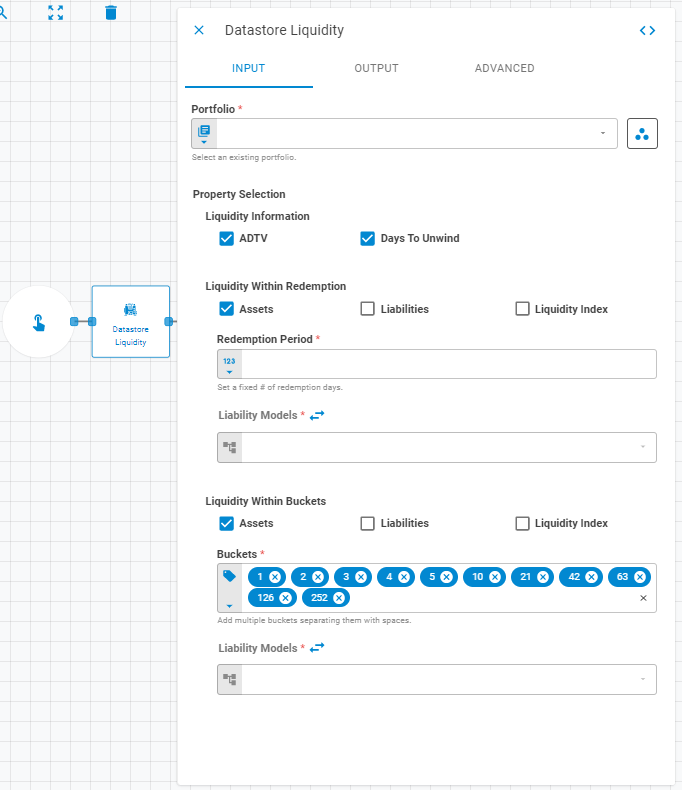
| Portfolio | The source portfolio. Accepts Fixed Portfolio, Get Latest, or Upstream Data |
| Liquidity Information | Adds liquidity info columns to the result datastore. ADTV adds an ADTV column; Days To Unwind adds a Days To Unwind column |
| Liquidity Within Redemption | Calculates liquidity based on a fixed redemption period for Assets, Liabilities, and Liquidity Index |
| Redemption Period | Fixed number of redemption days. Accepts Fixed Number or Upstream Data |
| Liability Models | A list of liability models used in the redemption calculation. Pass as a list from upstream data, or define models individually using the expand toggle |
| Liquidity Within Buckets | Calculates liquidity across time buckets for Assets, Liabilities, and Liquidity Index |
| Buckets | Redemption period buckets. Accepts Fixed Tags or Upstream Data |
Output
| Field | Description |
|---|---|
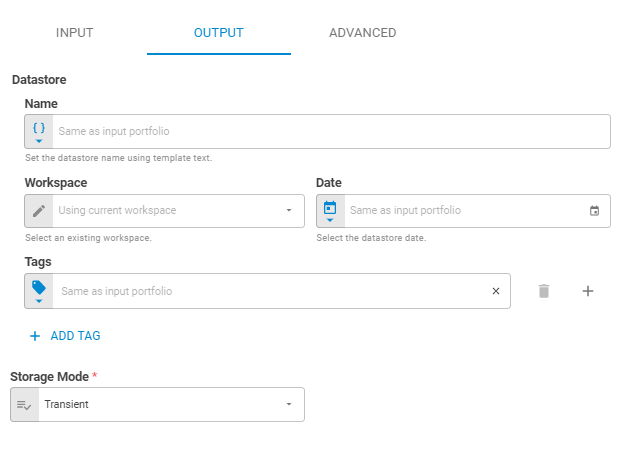
| Name | Name of the output datastore. Accepts Template Text or Upstream Data |
| Date | Date of the output datastore. Accepts Fixed Date or Upstream Data |
| Workspace | Workspace where the output datastore will be saved. Accepts Fixed Workspace |
| Tags | Tags for the output datastore. Accepts Fixed Tags or Upstream Data |
| Storage Mode | Transient — exists only within the current workflow run (default); Create — saves the datastore to the platform |
Advanced
| Field | Description |
|---|---|
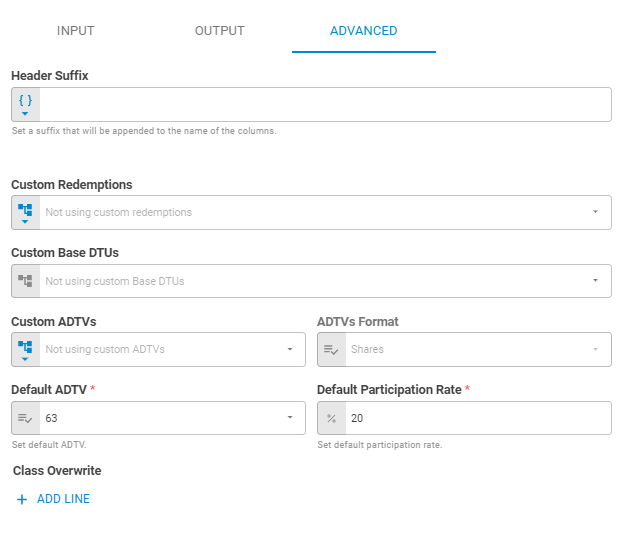
| Header Suffix | Suffix appended to the end of column names in the output datastore. Accepts Template Text or Upstream Data |
| Custom Redemptions | Custom redemption schedule. Accepts Upstream Data, Fixed Datastore, or Get Latest |
| Custom Base DTUs | Custom base days-to-unwind values. Accepts Upstream Data |
| Custom ADTVs | Custom average daily trading volumes. Accepts Upstream Data, Fixed Datastore, or Get Latest |
| ADTVs Format | Format of the provided custom ADTVs — Shares or Notional |
| Default ADTV | Default ADTV source when no custom value is provided |
| Default Participation Rate | Default participation rate. Accepts Fixed Percent |
| Class Overwrite | Customized ADTVs and participation rates for specific instrument classes. Click Add Line to configure each class |
Result
Once the worker finishes successfully, it returns a result object containing the datastore. You can check the Output Types article to learn more about result object types.
- Datastore (datastore)
- ID (string)
- Name (string)
- Date (date)
- Tags (list of strings)
- Data (list of lists)