Portfolio Generator
The Portfolio Generator worker creates a new portfolio in the Everysk format from user-supplied parameters. Securities can be provided via a datastore, a file, or a list. The resulting portfolio can be saved to the platform or used transiently within the workflow.

Parameters
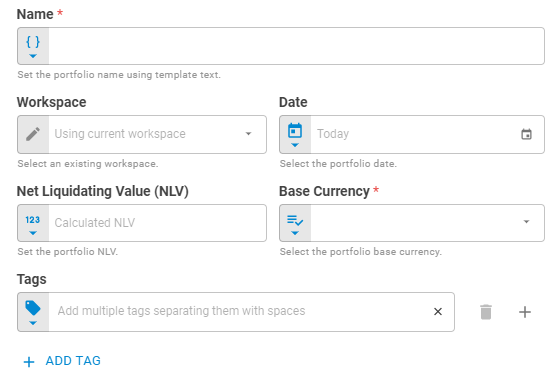
The Portfolio Generator worker has a flat configuration panel with no separate tabs.
| Field | Description |
|---|---|
| Name | Name of the portfolio. Accepts Template Text or Upstream Data |
| Workspace | Workspace where the portfolio will be saved. Accepts Fixed Workspace. Default is Using current workspace |
| Date | Date of the portfolio. Accepts Fixed Date or Upstream Data. Default is Today |
| Net Liquidating Value (NLV) | Portfolio NLV. Accepts Number or Upstream Data |
| Base Currency | Portfolio base currency. Accepts Fixed Select or Upstream Data |
| Link UID | Portfolio link UID. Accepts Template Text or Upstream Data |
| Tags | Portfolio tags. Accepts Fixed Tags or Upstream Data |
| Securities | The list of securities for the portfolio. Accepts Fixed Portfolio, Upstream Data or individual security entries |
| Storage Mode | Whether the portfolio is saved to the platform or kept transient. Accepts Fixed Select. Options: Transient, Create, Update. Default is Create |
| Projection | Which portfolio attributes are returned downstream. Accepts Fixed Select. Default is Without Data |
Result
Once the worker finishes successfully, it returns the generated portfolio.
- Portfolio (portfolio)
- ID (string)
- Name (string)
- Tags (list)
- Date (date)
- Base Currency (string)
- NLV (number)
- Securities (list)
- ID (string)
- Status (string)
- Instrument Class (string)
- Symbol (string)
- Label (string)
- Quantity (number)